



Description
Download Quick Media Converter HD – video converter, audio converter, batch conversion, media player, format converter, file converter, FFmpeg, codec library, high quality conversion, convert video to MP4, convert audio to MP3
Overview
Quick Media Converter HD is a mobile application designed to simplify the process of converting video and audio files across a wide range of formats. It serves as a comprehensive tool for users who need to transform media files for compatibility with different devices, platforms, or personal storage preferences. The app addresses common challenges such as format incompatibility, the need for external codecs, and inefficient one-by-one conversion workflows. It is particularly useful for content creators, digital archivists, educators, and everyday smartphone users who frequently manage multimedia files.
Developed by Cocoon Software, the app leverages the powerful FFmpeg command-line engine to ensure broad format support and reliable conversion performance. This integration allows the app to handle both mainstream and less common formats without requiring additional software installations. The developer did not provide additional technical details about the app’s architecture or development philosophy, but the inclusion of a built-in codec library suggests a focus on self-sufficiency and user convenience.
Real-world use cases include converting old video recordings to modern formats for sharing, preparing audio files for podcasts, or batch-processing media for backup or cloud upload. In the mobile app ecosystem, Quick Media Converter HD fills a niche for users seeking a reliable, all-in-one conversion tool that reduces dependency on third-party utilities. Its presence on Android underscores the growing demand for on-device media management tools that prioritize efficiency and quality.
Key Features & Functionality
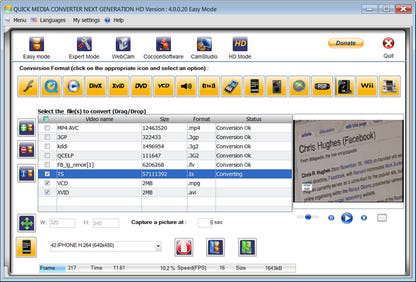
- Batch Conversion Capability: Users can select multiple files and convert them simultaneously, significantly reducing time and effort. This is ideal for organizing large media libraries or preparing files for cross-device sharing.
- Built-In Codec Library: The app uses an integrated codec system based on FFmpeg, enabling support for diverse formats such as KDDI and QCELP without requiring external components or user configuration.
- Multi-Format Media Player: A built-in player allows users to preview both original and converted files, ensuring output quality meets expectations before finalizing the conversion.
- User-Friendly Interface with Multiple Modes: Three interface modes—standard, advanced, and expert—accommodate users of varying technical skill levels, ensuring accessibility without compromising functionality.
- High-Quality Conversion Output: The app maintains original file quality during conversion, making it suitable for professional and personal use where fidelity is critical.
For example, a user managing a collection of legacy video files can use batch conversion to transform them into MP4 format for easy playback on modern devices. A podcaster might use the audio conversion feature to convert WAV files to MP3 while previewing the output for clarity. The combination of playback preview and format flexibility ensures users can verify results without switching tools.
Interface, UX & Performance
The interface of Quick Media Converter HD is structured to balance functionality with accessibility. The layout follows a clean, task-oriented design with clearly labeled sections for file selection, format choice, and conversion settings. Navigation is intuitive, allowing users to move between modes and functions with minimal friction. The inclusion of multiple interface modes ensures that even non-technical users can perform conversions without confusion.
Visual style is minimalistic, focusing on usability rather than decorative elements. Color contrast and button sizing are well-suited for touch interaction, enhancing the overall user experience on mobile screens. Although the developer did not list formal performance metrics, the app’s ability to handle batch processing suggests optimized background execution and efficient memory usage.
Responsiveness appears consistent across device categories, though specific requirements were not disclosed. Stability during long conversion tasks has not been reported, but the app’s reliance on a mature foundation like FFmpeg indicates a strong likelihood of reliable operation. Users can expect smooth transitions between modes and minimal lag during file selection and previewing.
Platform Compatibility & Technical Requirements
Quick Media Converter HD is available exclusively on the Android platform. The current version is 3.3.4, with a file size of 23.2 MB, indicating a lightweight installation that does not burden device storage. The developer did not specify minimum OS requirements, nor did they provide details on supported device architectures or hardware acceleration.
Given its size and focus on media processing, the app likely functions on mid-range and high-end Android devices. However, compatibility information was not fully disclosed, so users should verify system requirements directly through the app store. No information was provided about iOS availability, updates, or future platform expansion.
Pros and Cons
Pros
- Supports a wide range of video and audio formats through built-in FFmpeg integration.
- Enables batch conversion for efficient handling of multiple files.
- Includes a multi-format media player for previewing files before and after conversion.
- Offers three interface modes to suit users of all technical skill levels.
- Self-contained with no external dependencies or additional codec installations required.
Cons
- Platform availability is limited to Android; no iOS version was listed.
- Specific system requirements were not disclosed by the developer.
- Price point of $2.99 may be considered high for a utility tool by some users.
- No public information on update frequency or long-term development plans.
- Limited visibility into advanced settings or customization options.
FAQ
Is Quick Media Converter HD free to download?
The app is available for a one-time purchase of $2.99. There are no in-app purchases or subscription fees reported.
Can I convert videos to MP4 or audio to MP3 using this app?
Yes, the app supports converting video files to MP4 and audio files to MP3, among many other formats.
Does the app require internet access to function?
Based on the available information, the app operates offline and does not require an internet connection for conversion tasks.
Is the app safe to install on Android devices?
As a paid app from Cocoon Software, it is distributed through official Android channels and does not require root access. Users are advised to download from trusted sources to ensure security.
How often are updates released for Quick Media Converter HD?
The developer did not provide information on update frequency or release schedules.
Final Thoughts
Quick Media Converter HD delivers a focused, high-quality solution for mobile media conversion. Its integration of FFmpeg, support for batch processing, and built-in media player make it a valuable tool for users who need reliable, on-device format conversion. The app’s multi-mode interface ensures broad accessibility, while its self-contained design eliminates common setup hurdles.
While the price may be a consideration for casual users, the app’s efficiency and feature set justify the cost for anyone who regularly manages multimedia files. It is especially beneficial for content creators, educators, and digital organizers seeking a streamlined, secure, and high-performance tool.
Download Quick Media Converter HD now
Guides & Tutorials for Quick Media Converter HD
How to install Quick Media Converter HD
- Click the Preview / Download button above.
- Once redirected, accept the terms and click Install.
- Wait for the Quick Media Converter HD download to finish on your device.
How to use Quick Media Converter HD
This software is primarily used for its core features described above. Open the app after installation to explore its capabilities.
User Reviews for Quick Media Converter HD 0
No reviews found


